Brakes for automated systems: what Cloudflare's November spending limits stop
Start with the caveat, because it is the most useful sentence in the documentation. Cloudflare's own page on its new spending limits says that a limit "does not guarantee a maximum invoice amount". That is an unusually plain thing for a vendor to print, and it sets the right expectation for everything below. These controls reduce the size of a bad weekend. They do not turn usage-based pricing into a fixed price.
With that said, the gap they close is real. An agent or scheduled job that loops overnight keeps consuming compute and model requests until somebody looks. Until this month the answer on Cloudflare was an email. Now there is also a stop.
What shipped, and when
- 10 November 2026. Workflows, Cloudflare's service for long-running multi-step jobs, gained a concurrency limit per Workflow. You set how many instances of one Workflow may run at the same time. It needs Wrangler 4.127.0 or above.
- 13 November 2026. Spending limits for Workers and Durable Objects arrived, with the note that support for more products is coming.
- 20 November 2026. Version 0.34.0 of Cloudflare's Agents SDK lets a tool call wait for a person's approval before it runs. According to the release note the waiting call holds no invocation, so the Durable Object behind it can hibernate in the meantime.
One older piece completes the picture. Budgets on model requests have been available in Cloudflare's AI Gateway since June. The compute limit and the model budget are separate controls, and a system that uses both products needs both.
How each control behaves
Spending limit on compute. Set in the billing area, one dollar figure per product. Per the documentation it applies across the whole account for the current billing period, and it has two modes: block usage at the threshold, or send an email and keep running. Notifications go out at 80% and 100% of the figure. Once a Workers limit takes effect, Cloudflare rejects new invocations, which covers incoming HTTP requests, cron triggers, queue consumers and inbound email handlers. Visitors receive error 1103. Static assets served without running Worker code stay available. Service resumes when you raise the limit above current spend, switch it off, remove it, or the next billing period begins.
Budget on model requests. An AI Gateway spend limit is a dollar budget over a time window, scoped by provider, model, or a metadata key of your own such as an agent ID. Split by that key and each agent gets its own budget. Over budget, the gateway returns a 429, or routes to a cheaper fallback model if you have configured one. A gateway takes up to 20 rules.
Concurrency limit per Workflow. Instances above the limit are queued and start as running ones finish, as the documentation describes; they are not rejected. Instances that are paused or in a longer wait give their slot back. There is one exception: on Workers Paid, an instance created by the Workflow's own cron schedule is not held back by the limit, and does not use a slot, for up to one hour per firing.
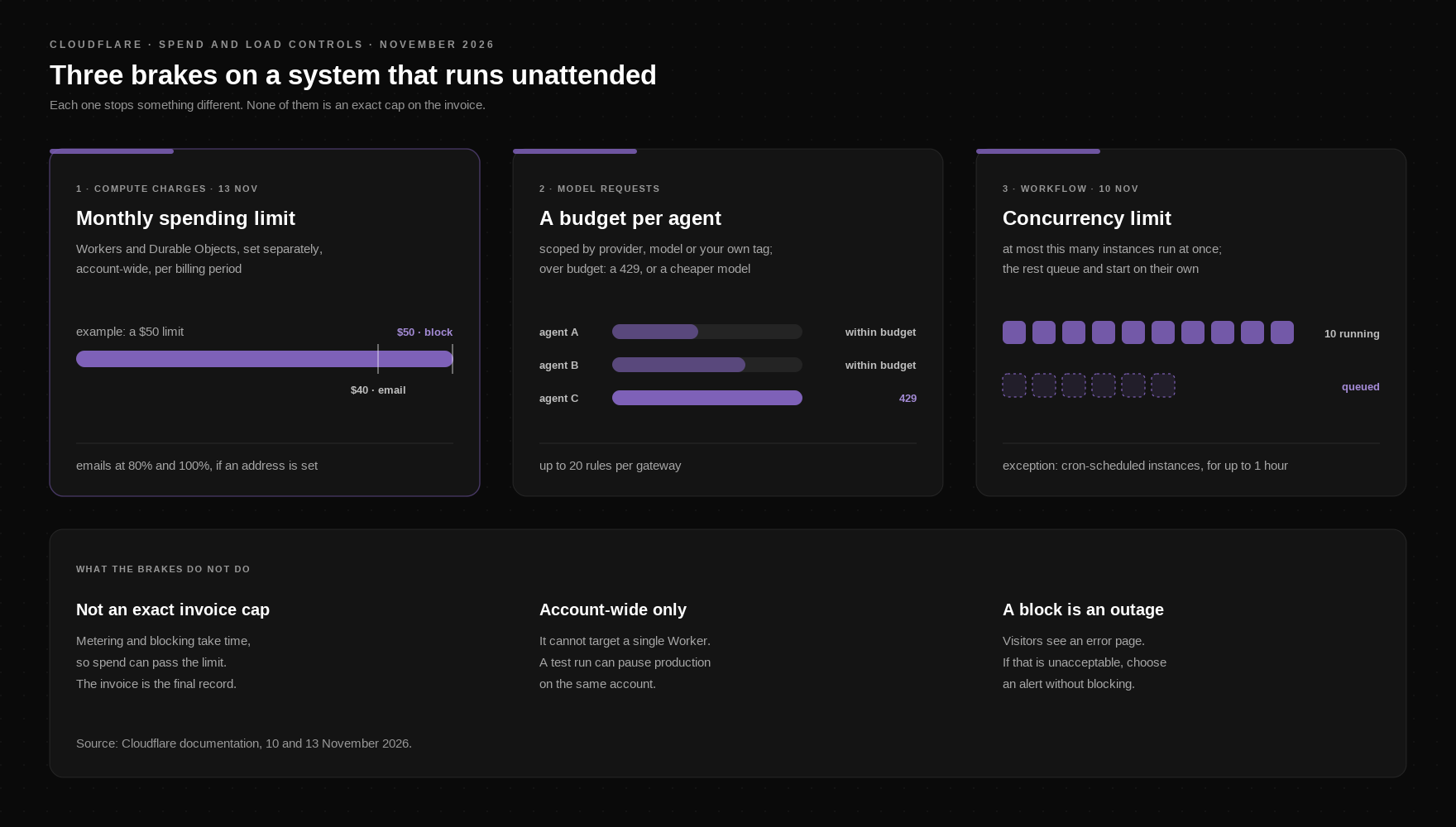
Three brakes at three levels: compute charges, model requests, and how many instances run at once.
Why it matters commercially
The worst case gets an order of magnitude. Before an unattended system goes live, somebody usually asks what it could cost if it misbehaves. A limit and a budget give that question an approximate answer in advance.
It protects the system you are calling. Many CRMs and accounting tools restrict concurrent requests and slow down or refuse beyond that. A bulk job that starts several thousand instances at once fails at the other vendor's end and leaves your process half finished. A concurrency limit spreads that load over time.
There is a record. The billing area keeps an audit log of who changed a limit and when, and Cloudflare records when spend reaches 80% or 100% of a threshold.
Where we would use it
- A separate test account with a low limit and blocking on. An outage there costs little.
- Alerts without blocking on anything customer-facing. If your website or booking form runs on the same account, a block takes those down too.
- One budget per agent. A looping agent then spends its own allowance while the others keep working.
- A concurrency limit on bulk jobs. Refreshing a few thousand company records runs ten at a time, with the remainder queued.
- An approval step before anything that sends or pays. The tool call can wait for a person.
Limits and risks
It is not an exact cap. Metering and blocking take time, so recorded spend can pass the limit, and the invoice remains the final record. The model budget works from estimated cost and a burst of simultaneous requests can briefly overshoot it.
It is account-wide. A limit cannot target one Worker, application or environment. The documentation gives the example itself: a test Worker can reach the shared limit and interrupt a production Worker on the same account. A Workers limit does not cover Durable Objects, storage products or model requests, and the monthly subscription fee is charged separately.
A block is an outage. While it lasts visitors see an error and scheduled jobs are skipped. Charges for stored data continue during the pause.
Scheduled runs can pass the concurrency limit. Because of that exception, a cron-scheduled refresh can run more instances than the figure you set, for up to an hour. If the limit exists to protect somebody else's system, plan for that case separately.
Two settings are easy to lose. A limit created in the dashboard has no email recipient until you add one. A concurrency limit is applied from your configuration on every deploy, so a deploy without it removes the limit. It is also not applied in local development.
Our read on it
Some of our own systems run on Cloudflare, so this is the order we would follow. Alerts first, everywhere, since an alert interrupts nothing. Then a model budget per agent, because that is where spend moves fastest. Then a concurrency limit on every workflow that calls somebody else's system. A blocking limit goes only where an outage costs less than an overrun, with test work moved to its own account so an experiment cannot pause the live site.
A brake is only useful if you have decided beforehand what happens when it bites: who gets the email, who may raise the limit, and which parts must keep running regardless.
For the related question of how to give an agent your procedures in a form you can track, see Written procedures for agents.
We'll build this for your business too.
Free consultation: 15 minutes, a concrete recommendation, no obligation.