What does ChatGPT see on your website? The raw HTML view
You open your website and everything is where it should be: the headline, the services, the FAQs. ChatGPT's crawler may be looking at the same page and seeing an empty frame.
You won't notice the gap until you look for it. This guide shows you how to look.
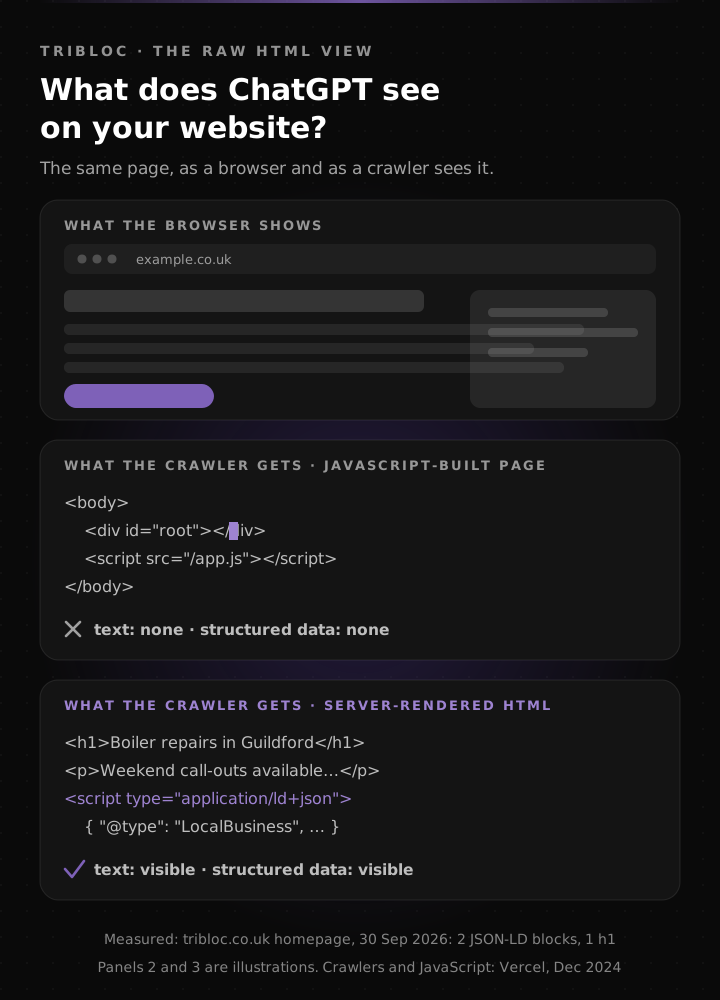
What the browser shows, and what the crawler gets. Panels 2 and 3 are illustrations; the figure in the footer is a measurement.
Why does a crawler see something different from your browser?
A browser downloads the page, runs its JavaScript, and shows you the result. Most citation crawlers skip the second step and read only what's in the server's first response.
Vercel measured this across its own network in December 2024. None of OpenAI's crawlers executed JavaScript: not OAI-SearchBot or ChatGPT-User, which serve ChatGPT search, and not GPTBot, which collects training data. The same was true of Anthropic's ClaudeBot and of PerplexityBot. ChatGPT's and Claude's crawlers did download script files; they just didn't run them. Google is the exception: according to the same study, Gemini uses Googlebot's infrastructure, which does render JavaScript.
Crawler behaviour can change, so treat this as a dated measurement. We still build our own sites so that the main content is in the raw HTML.
What goes missing from the raw HTML?
On a page built entirely by JavaScript, often everything. The server's first response is little more than an empty container and a script reference; the text only appears in the browser.
Partial gaps are common too:
- the business's structured data is injected at runtime by a plugin or tag manager,
- FAQ answers load later from an accordion component,
- prices or reviews arrive from a third-party widget.
This happened on one page of an earlier version of our Hungarian site: the FAQ structured data was added by a script at runtime, so it was missing for exactly the crawlers it was meant for. On our current site, the structured data is in the raw HTML.
How can you check in two minutes?
1. View the page source. In Chrome or Edge, press Ctrl+U (Cmd+Option+U on a Mac). That's the raw HTML, without JavaScript. Search it for a sentence from your homepage. If it isn't there, the crawler can't see it either.
2. Switch JavaScript off. In Chrome, open developer tools (F12), press Ctrl+Shift+P (Cmd+Shift+P on a Mac), type “Disable JavaScript”, and reload the page. What's left is roughly what a citation crawler receives.
3. Run one command. This counts the structured data blocks in the raw HTML:
curl -fsSL https://example.co.uk/ | grep -o '<script[^>]*application/ld+json' | wc -lReplace example.co.uk with your own address. The -L follows redirects (to the www
address, for example); without it, the command would read only the redirect response and
show a misleading 0. If the command also prints an error (such as curl: (6) or
curl: (22)), the fetch failed, and the 0 next to it tells you nothing about structured data.
If the result is 0 with no error, there's no structured data in the raw HTML. The exact
pattern matters too: a simpler search on our own homepage returned 4
matches, but the real number of blocks is 2, because the framework's data payload contains
the same text.
You can run the same check as a citation crawler: add -A "OAI-SearchBot" after curl. We
fetched our own site this way and got the same 2 blocks back. If you get an error at this
step (a 403, for example), a hosting or firewall setting may be blocking the crawler as well.
What should you look for in the raw HTML?
- your main heading (
<h1>) and the text describing your services, - your business's structured data (
application/ld+json), including name, address, phone number and external profiles, - the answers to your FAQs, not only the questions,
- your prices, if customers ask about them.
Check your robots.txt too (your address followed by /robots.txt). Blocking training bots is
a business decision; blocking citation bots takes you out of the answers.
We explain the difference here.
What if the raw HTML is empty?
The content needs to be in the server's first response. There are three ways to get it there:
- Server-side rendering or a static site. Our own sites are built this way: the main text and the structured data are already in the downloaded HTML.
- Structured data written into the HTML instead of injected by a script.
- Key text moved out of script-built components, at least on the homepage and service pages.
If your website builder allows none of these, that's worth knowing before you spend money on visibility work. For what we found when we checked the websites of GEO providers themselves, see our market measurement.
One measured figure from our own site: on 30 September 2026, the raw HTML of the tribloc.co.uk homepage contained 2 JSON-LD blocks (FAQs and business details) and 1 h1 heading, and robots.txt allowed all crawlers.
Frequently asked questions
Does ChatGPT's crawler run JavaScript?
According to Vercel's December 2024 measurement, no: OpenAI's crawlers (OAI-SearchBot and ChatGPT-User, which serve ChatGPT search, and GPTBot) didn't execute JavaScript, even the script files they downloaded. The crawler sees what's in the server's first response.
How do I know whether my site is built by JavaScript?
View the page source (Ctrl+U in Chrome, Cmd+Option+U on a Mac) and search for a sentence from your homepage. If it isn't there, a script draws the text, and citation crawlers can't see it.
What is JSON-LD?
A standard format for structured data: a block of code that describes, in machine-readable form, who the business is, what it does and where to find it. A crawler can read who the page is about without interpreting the prose.
Does Google work the same way?
Partly. According to Vercel's measurement, Gemini uses Googlebot's infrastructure, which renders JavaScript. For the crawlers behind ChatGPT and Perplexity, the raw HTML is what counts, so it's worth designing for that.
Is having the content in the raw HTML enough?
It's necessary, but not sufficient. It means the crawler can see the page. Whether the page gets cited also depends on mentions elsewhere, connected business data and citable, measured specifics.
If you'd rather not open a terminal, the free AI visibility test does the same check for you, starting with whether your content is visible without JavaScript.
We'll build this for your business too.
Free consultation: 15 minutes, a concrete recommendation, no obligation.