From a Maps list to an account view, with four Apify Actors
Most prospecting starts with a list: a Google Maps export of every dentist in a city, a column of domains from a trade fair, or the accounts already sitting in your CRM. A list like that tells you who exists. It does not tell you who to call, whether the company is what it says it is, or whether now is a sensible time to get in touch.
We built four Actors on the Apify Store, each answering one of those questions from a company's own website and, where possible, an official register. They share an input format and an output key, so the result of one run can start the next. This post walks through each one, then shows how to chain them.
Everything below comes from what the Actors do today, as documented on their Store pages. Where an Actor cannot answer, it says so in the row. That matters more than any single column, so it gets its own line in every section.
1. Who runs the business: Website Contacts
Start with a Google Maps dataset. Run Google Maps Scraper for your niche and area, copy
the run's dataset ID, and start
Website Contacts & Decision Makers
with datasetId set to it. The Actor never searches Google Maps itself; it works on the
dataset you bring.
You get one row per website: emails labelled as role mailbox, personal, generic or
freemail; phone numbers in international format; and the owners, founders, directors
and department heads named on the site, each with a role and a role category. Every email
and every person carries the source_url of the page it was found on, so you can open
that page and check before you write to anyone.
What it will not do: it does not guess emails, it does not use LinkedIn, and it does
not decode email protection scripts. A row where the site hides its addresses is flagged
with email_hidden_by_protection: true instead.
Illustrative example (fictional business, shortened row):
{
"domain": "harbourview-dental.co.uk",
"primary_email": "[email protected]",
"decision_makers": [
  {
    "name": "Priya Lambert",
    "role": "Practice Owner",
    "role_category": "owner",
    "source_url": "https://www.harbourview-dental.co.uk/our-team/"
  }
]
}
Names and personal work emails are personal data under UK GDPR. If you store or use them, you need a lawful basis, and PECR applies to your outreach.
2. What the register confirms: Company Enrichment
Company Enrichment by Domain takes a domain list and reads the company's legal notice first: the company number, VAT number and legal name it publishes about itself. That evidence is then looked up in an official register. For UK companies that is Companies House, which gives the active directors and secretaries; size and financials are not published there. Your own free Companies House API key is optional.
A name alone is never enough for a match. A register hit found by name is accepted only
when the register address also appears on the company's website and exactly one
candidate fits. Every match carries registry_match_confidence and says what it was
matched by.
What it will not do: guess. A domain without a confident match still gets its
website, DNS and technology profile, with registry_verified: false. Read that as
"unconfirmed", not as "fake". Headcount and revenue only appear where a register publishes
them.
3. Who is hiring for the role you serve: Company Hiring Signals
A company that is hiring has a budget and a new problem. One hiring five salespeople needs
sales tools and training; one hiring its first HR manager needs payroll software.
Company Hiring Signals checks each
company's careers page and job board and returns the open jobs, each with a job function
and seniority level, plus signals such as hiring_sales or hiring_leadership. Sort your
account list by the function your product serves.
The hiring_score (0 to 100) is computed only from the jobs in the same row, from volume,
freshness, leadership roles and breadth, so you can check how a company got its number.
What it will not do: treat unknown as "not hiring". The status has four values:
hiring: at least one open job was found.not_hiring: the job board was read and is empty, or the careers page says there are no openings.unknown: a careers page or job board exists, but its jobs could not be read (for example a board that only renders with JavaScript).no_careers_page_found: no careers page was linked, and none sits at/careersor/jobs.
Only the second is a "no". It does not use LinkedIn, Indeed or other job portals.
4. A call list per service: Local Business Leads Audit
If you sell a service to local businesses,
Local Business Leads Audit
turns a Google Maps dataset into one row per business: the contacts and decision maker
from the website, a 28-point website audit, and an opportunity score from 0 to 100 for
each service an agency sells, such as local_seo, online_booking or
email_deliverability. Set Your service in the input and those findings come first in
the row's pitch lines.
Each audit check answers pass, warn, fail or unknown. A check the crawl could not
answer stays unknown and does not count in the score. Online booking is only judged for
businesses that take appointments, so a plumber is not pitched a booking tool.
What it will not do: forecast. The scores rank the leads of one run against each other; they are not a revenue prediction. "Not detected" means not found on the pages read.
5. Chaining them, and joining on domain
Every one of the four Actors accepts a datasetId, and every one reads the website
column of that dataset first. Every output row carries a website column too. So the
dataset of one run can start the next: Maps dataset into Website Contacts, its dataset
into Company Enrichment, that dataset into Company Hiring Signals. An Apify integration
can start each run when the previous one succeeds.
{
"datasetId": "DATASET_ID_OF_THE_PREVIOUS_RUN"
}
Each Actor produces its own table. To see one company across all four, join the tables on
the domain column. Two kinds of row have no domain: a job board URL given straight to
Company Hiring Signals, and a listing without a website in Local Business Leads Audit.
For those, domain is null, and you join on input_url or source_item.placeId
instead.
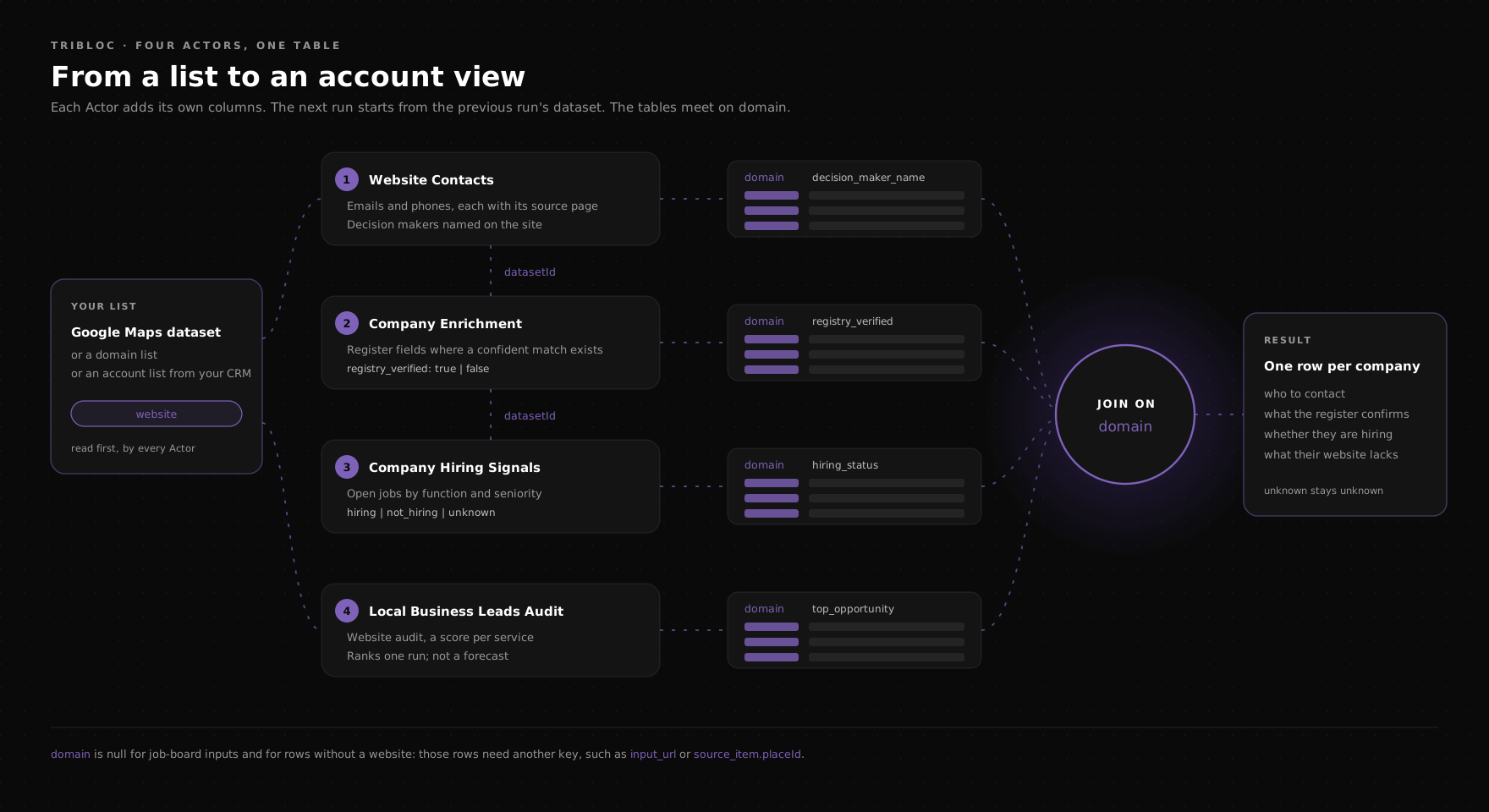
Each Actor adds its own columns; the tables meet on domain.
The joined table is a set of facts per company, each with its source. Ranking those rows against your ideal customer profile, with the evidence for each account kept alongside, is a separate piece of work; we cover it in Tribloc Lead Intelligence.
What it costs
Each Actor is pay-per-result: you pay for results, not for compute time, and rows for websites that could not be read are free and carry the reason. Each Actor also respects your maximum cost per run. The current prices are on each Store page:
- Website Contacts & Decision Makers
- Company Enrichment by Domain
- Company Hiring Signals
- Local Business Leads Audit
Tribloc
If you want this chain connected to your CRM or adapted to your market, we build these setups. Get in touch at tribloc.co.uk.
We'll build this for your business too.
Free consultation: 15 minutes, a concrete recommendation, no obligation.